插槽 Slot
Slot 插槽布局
使用Slot布局容器,可以将视图渲染在一个View中,可以理解为一个弹窗视图,渲染在当前View中,但数据依然是以独立的视图存在。
Slot API
ISlotProps
| 参数 | 类型 | 说明 | 默认值 |
|---|---|---|---|
| name | string | 插槽名称 slot key | - |
| names | string | 多个插槽名称 slot key,使用’,‘隔开,配合initView数组时使用 | - |
| initView | string | string[] | 页面加载时默认打开的初始视图viewKey,可以为数组,接受一组打开的视图key | - |
| env | IDictionary | 初始视图的env | - |
| record | IDictionary | IDictionary[] | 初始视图的record | - |
Slot 示例代码
<View version="2"> <Table model="modelA"> <Fields> <Field name="a" /> </Fields> <!-- 使用openViewType,指定视图渲染到name为slot1的Slot布局容器上(如果openViewType不为Self/Dialog/Columns/Drawer/Reload的时候,将识别为slot名称) --> <RecordActions> <Action targetView="modelA_detail" openViewType="slot1" /> </RecordActions> </Table> <!-- 使用slot布局容器占位,指定name --> <Slot name="slot1" /></View><View version="2"> <LinkTabs> <!-- 使用openViewType,指定视图渲染到name为slot1的Slot布局容器上(如果openViewType不为Self/Dialog/Columns/Drawer/Reload的时候,将识别为slot名称) --> <LinkTab title="所有订单" targetView="trade_TradeOrderBO_TradeOrderListForSeller" openViewType="slot1" record="#{{orderStatus:'ALL_ORDER'}}"/> <LinkTab title="待付款" targetView="trade_TradeOrderBO_TradeOrderListForSeller" record="#{{orderStatus:'PENDING_PAY'}}"/> </LinkTabs> <Table model="modelA"> <Fields> <Field name="a" /> </Fields> </Table> <!-- 使用slot布局容器占位,指定name --> <Slot name="slot1" /></View>注意:当前例子为0.17.x 版本
交互效果
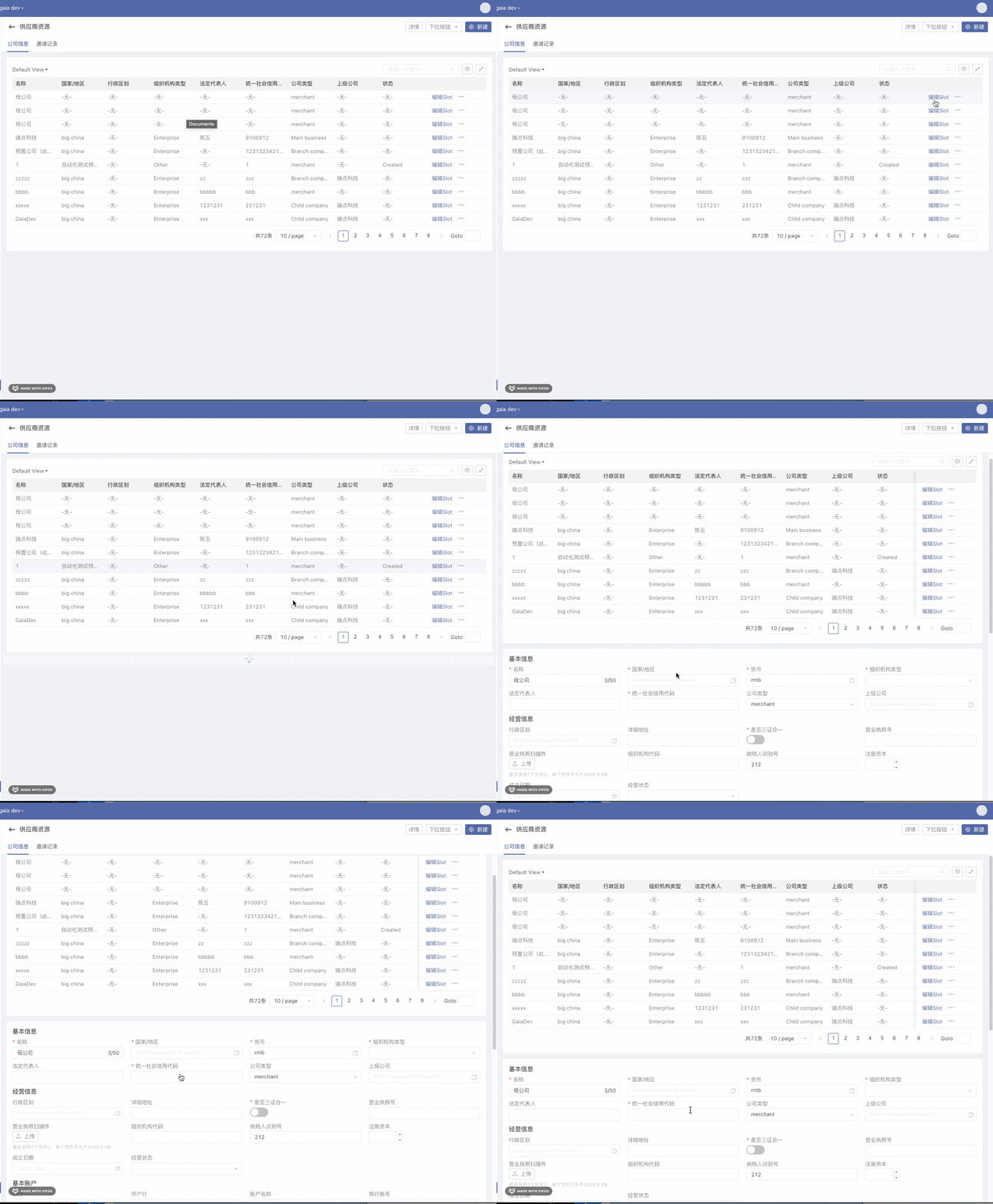
注意:
- OpenViewType属性可指定Slot name,只能是当前View的Slot
- Slot类型的视图没有Page Header/Footer
- Slot视图内不支持继续内嵌Slot,但可以使用openViewType=“Inherit” 替换当前视图
- Slot视图中Action的GoBack/Close/GoBackWithContext/GoBackToSource行为,和弹窗一致,会关闭Slot视图
- 在同一个视图中使用同一个Slot打开新视图,会替换掉目标Slot的内容,Slot内部没有history,不会有回退操作。
获取slot视图内的信息
打开的slot视图归属于当前视图,在当前视图的controller中可以通过以下途径取到slot视图的信息/操作视图内的容器
export default class extend Controller {  doSomething () {    // 若当前view中存在key为tableA的容器,可通过this.tableA直接访问到(DSL中直接用tableA可以访问到)    this.tableA.data // 等效于 getContainerByKey(containerKey).data
    // 通过 this.getView(slotKey) 来获取slot视图的controller对象    this.getView('slot1')
    // 进一步使用key获取到某个容器    this.getView('slot1').companyDetail
    // 读取/操作容器数据,用法和 getContainerByKey(containerKey) 一致    this.getView('slot1').containerKey.data    this.getView('slot1').containerKey.validate()    this.getView('slot1').containerKey.updateData({ ... })
    // 读取目标视图的所有容器    this.getView('slot1').containers
  }}