菜单项
since 0.13
菜单的配置由运行态迁移到了研发态,在研发态配置菜单时,之前的处理方式是菜单直接关联路由地址。与之前不同的,在0.13之后,增加了模块下菜单项资源,由菜单项关联路由,菜单关联菜单项的方式配置菜单。
菜单项配置方式
菜单项通过Json文件配置,用户需要将*-menu-item.json文件放置在classpath下,与之间的-actions.json同一目录级别,内容为:
[ { "originalKey": "registerList", "name": "注册列表", "routingType": "Action", "routeKey": "terminus_trantor_demo_User_Register_List", "desc": "a", "businessDimensionKey":"terminus_trantor_demo_BusinessDimension", "params": "{\"modelKey\": \"base_xxx\", \"record\": {}, \"env\": {}}" }]配置开发文档见:菜单项定义
routingType配置
菜单项对应的路由类型routingType分为三种,分别是:
public enum RoutingType { @Label("行为") Action, @Label("外部链接") URL, @Label("内嵌页面") IFrame,}routeKey配置
与菜单项新增页面字段对应一致,originalKey需要保证在模块下唯一。businessDimensionKey对应的是业务维度key,目的是为了在应用关联菜单时,可以通过业务维度过滤,但是当前该功能未实现,可不填。
routeKey 在routingType 为外部链接或者内嵌页面时,为用户输入的路由地址,如:https://www.baidu.com/。
当routingType 为 行为 时,routeKey由*-action.json的内容构成,Action类型为“view” 规则为:
action文件配置如下,则 用户体量列表 对应的对应的路由地址为 forModel+key 。
[ { "forModel": "terminus_trantor_demo_User", "key": "Register_List", "name": "用户体量列表", "type": "View", "extra": { "dataSource": "DataStore", "condition": "moduleSpecificVersion == id", "openViewType": "Self", "targetType": "List" } }]除了action 文件对应的action行为,系统也有一些默认的view action,默认视图分别是:
listAll,toEdit,toDetail因此,用户也可以配置以下菜单项。
[ { "originalKey": "listAll", "name": "列表", "routingType": "Action", "desc": "listAll", "routeKey": "terminus_trantor_demo_User_listAll" }, { "originalKey": "toEdit", "name": "编辑", "routingType": "Action", "desc": "toEdit", "routeKey": "terminus_trantor_demo_User_toEdit" }, { "originalKey": "toDetail", "name": "详情", "routingType": "Action", "desc": "toDetail", "routeKey": "terminus_trantor_demo_User_toDetail" }]params 配置
since 0.15
在配置菜单,选择菜单项时,会将params参数带入到额外参数里。
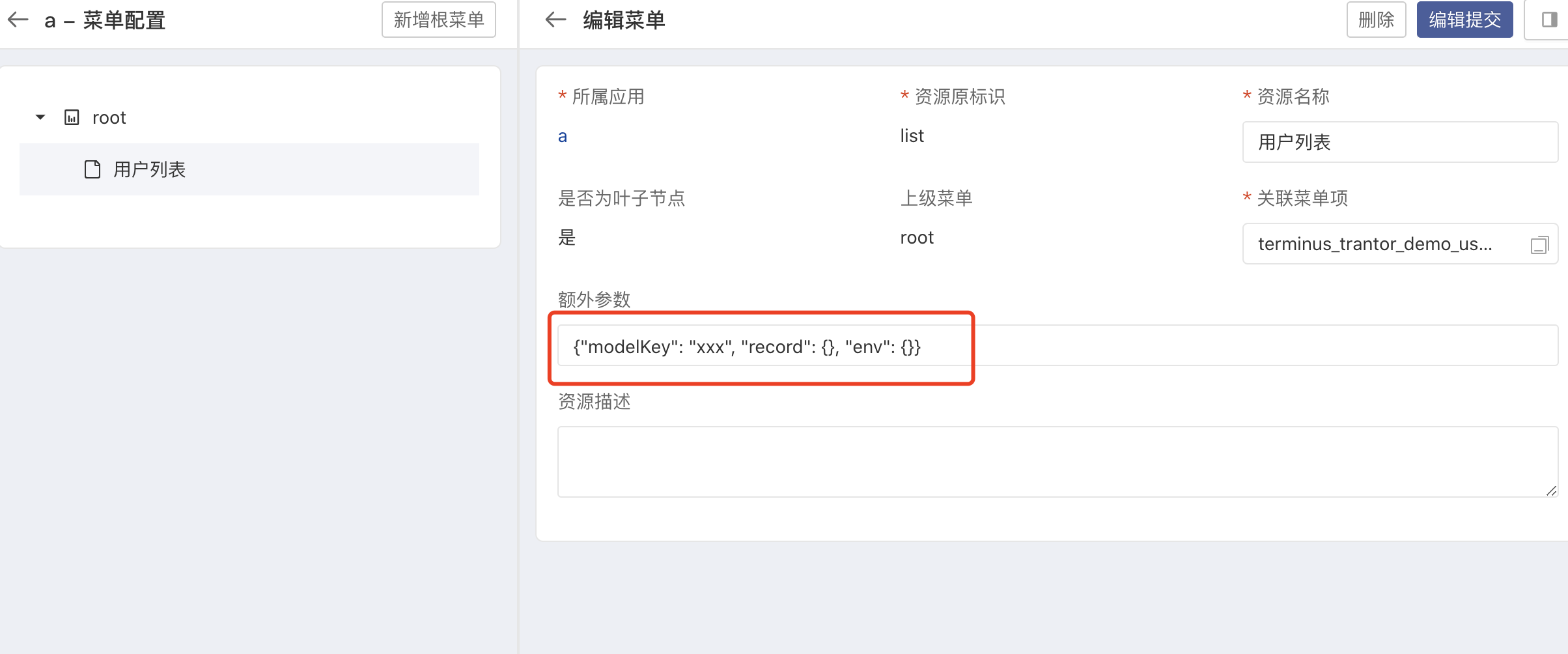 功能:当前菜单打开的页面传参
- 格式为标准的 JSON
- 参数格式为:
{"modelKey": "xxx", "record": {}, "env": {}} - 其中
modelKey, record会作为data-source接口的queryValues参数,env会传给下个页面
businessDimensionKey配置
暂未实现。
与应用下的业务维度相匹配。