栅格 Grid
Grid
布局的栅格化系统,我们是基于行(row)和列(col)来定义信息区块的外部框架,以保证页面的每个区域能够稳健地排布起来。Row和Col可以相互嵌套。下面简单介绍一下它的工作原理:
-
通过row在水平方向建立一组column(简写col)
-
你的内容应当放置于col内,并且,只有col可以作为row的直接元素
-
栅格系统中的列是指1到24的值来表示其跨越的范围。例如,三个等宽的列可以使用.col-8来创建
-
如果一个row中的col总和超过 24,那么多余的col会作为一个整体另起一行排列
Row API
| 参数 | 说明 | 类型 | 默认值 |
|---|---|---|---|
| align | flex 布局下的垂直对齐方式:top | middle | bottom | string | top |
| gutter | 栅格间隔,可以写成像素值或支持响应式的对象写法 { xs: 8, sm: 16, md: 24} | number | object | 0 |
| justify | flex 布局下的水平排列方式:start | end | center | space-around | space-between | string | start |
| type | 布局模式,可选 flex,现代浏览器 下有效 | string | - |
Col API
| 参数 | 说明 | 类型 | 默认值 |
|---|---|---|---|
| span | 栅格占位格数(1 ~ 24) | number | - |
| offset | 栅格左侧的间隔格数,间隔内不可以有栅格 | number | 0 |
| order | 栅格顺序,flex 布局模式下有效 | number | 0 |
| pull | 栅格向左移动格数 | number | 0 |
| push | 栅格顺序,flex 布局模式下有效 | number | 0 |
| xs | <400px 响应式栅格,可为栅格数或一个包含其他属性的对象 | number|object | 0 |
| sm | ≥400px 响应式栅格,可为栅格数或一个包含其他属性的对象效 | number|object | 0 |
| md | ≥600px 响应式栅格,可为栅格数或一个包含其他属性的对象 | number|object | 0 |
| lg | ≥1024px 响应式栅格,可为栅格数或一个包含其他属性的对象 | number|object | 0 |
| xl | ≥1440px 响应式栅格,可为栅格数或一个包含其他属性的对象 | number|object | 0 |
| xxl | ≥1920px 响应式栅格,可为栅格数或一个包含其他属性的对象 | number|object | 0 |
应用场景
一般排版式布局,比如多个盒子几等分,按照宽度比例分等都可以采用grid布局,如下:
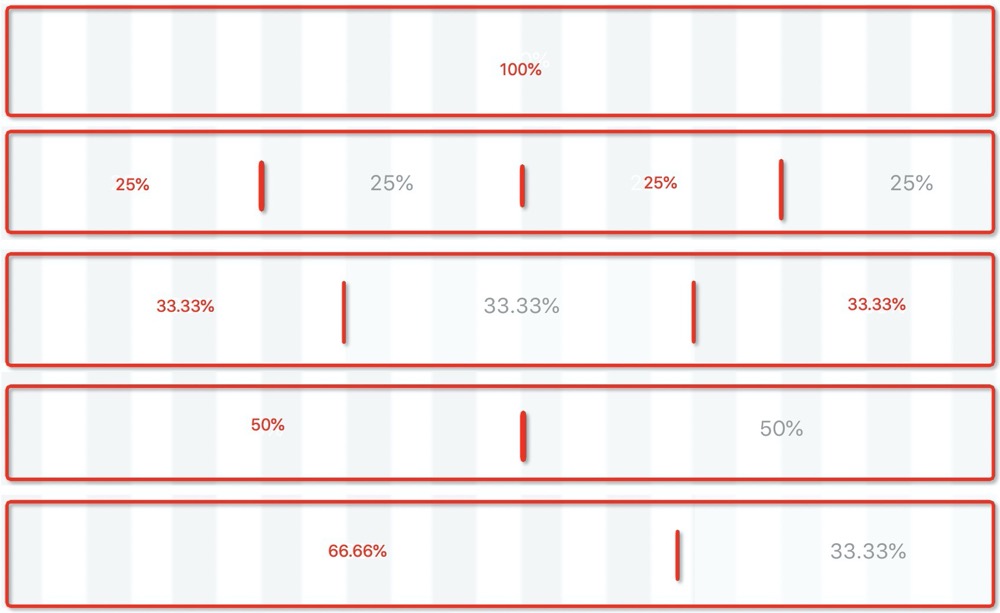
示例图
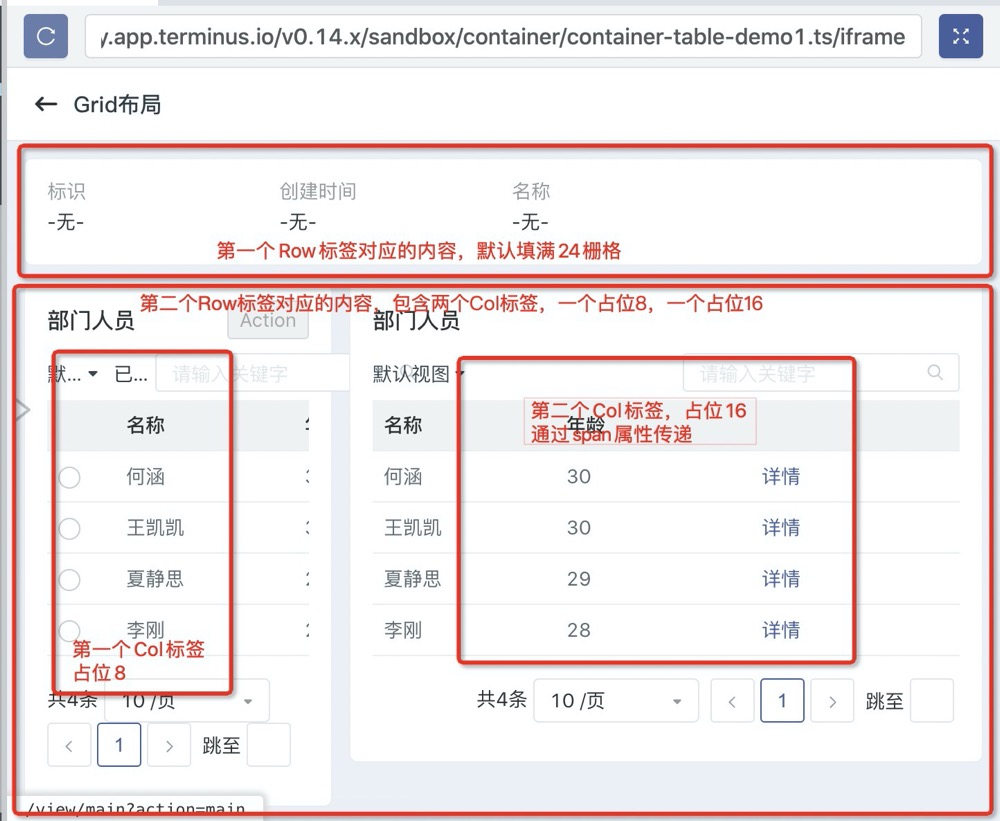
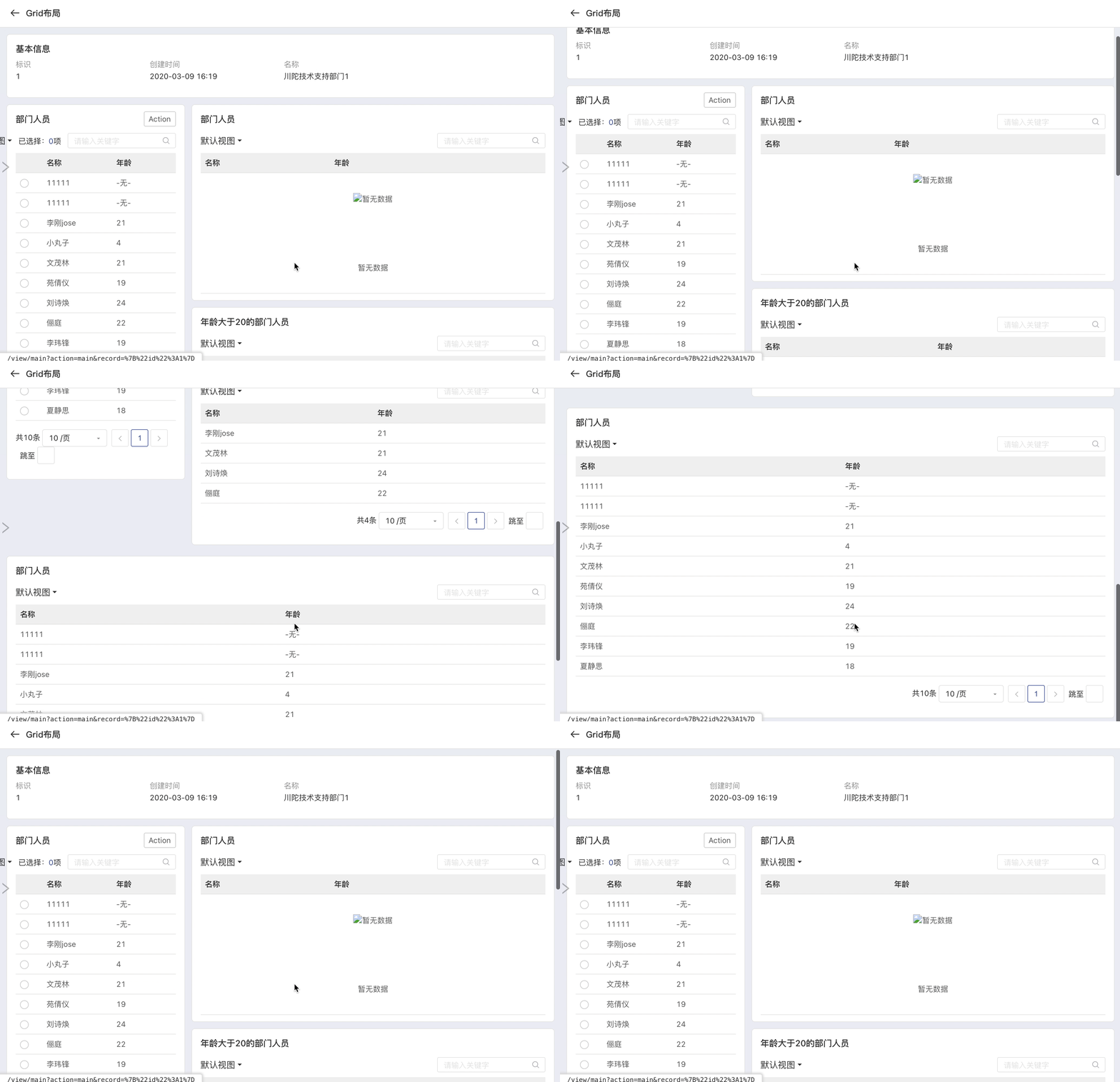
Grid 示例代码
<View title="Grid布局">  <Row>    <Detail key="department" model="trantor_doc_Department">      <Fields>        <Field name="id" />        <Field name="createdAt" />        <Field name="name" />      </Fields>    </Detail>  </Row>  <Row>    <Col :span="8">      <Table title="部门人员" key="main" model="trantor_doc_Person" related="department:department" singleSelection>        <Fields>          <Field name="name" />          <Field name="age" />        </Fields>        <Actions>          <Action multi @action="console.log" label="Action"/>        </Actions>      </Table>    </Col>    <Col :span="16">      <!-- related:所有 trantor_doc_Person 模型的 department 属性对应 key=department -->      <Table title="部门人员" model="trantor_doc_Person" related="department:department">        <Fields>          <Field name="name" />          <Field name="age" />        </Fields>        <RecordActions label="操作">          <Action @action="console.log" label="详情" openViewType="Dialog"/>        </RecordActions>      </Table>
      <!-- related:所有 trantor_doc_Person 模型的 department 属性对应 key=department -->      <Table title="年龄大于20的部门人员" model="trantor_doc_Person" :related="{field:'department:department', condition: 'age > 20', context: {record: {id: 1}}}">        <Fields>          <Field name="name" />          <Field name="age" />        </Fields>      </Table>    </Col>  </Row>  <Row>    <Table title="部门人员" model="trantor_doc_Person" related="department:department">      <Fields>        <Field name="name" />        <Field name="age" />      </Fields>    </Table>  </Row></View>
gutter 用法
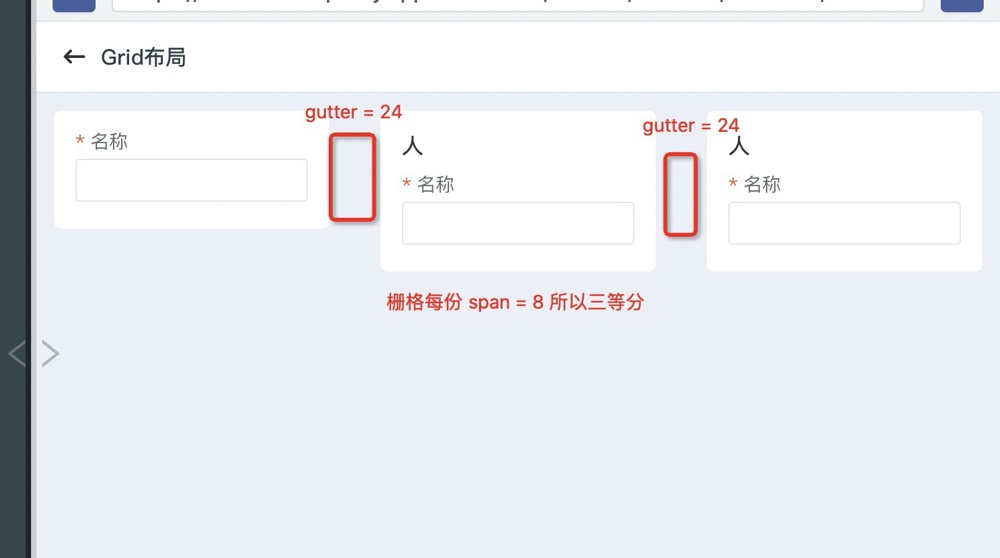
<View title="Grid布局"> <Row :gutter="24"> <!-- 间距gutter --> <Col :span="8"> <Form key="table" model="trantor_doc_Person"> <Fields> <Field name="name" /> </Fields> </Form> </Col> <Col :span="8"> <Form key="table" model="trantor_doc_Person"> <Fields> <Field name="name" /> </Fields> </Form> </Col> <Col :span="8"> <Form key="table" model="trantor_doc_Person"> <Fields> <Field name="name" /> </Fields> </Form> </Col> </Row></View>flex 布局
- 垂直对齐
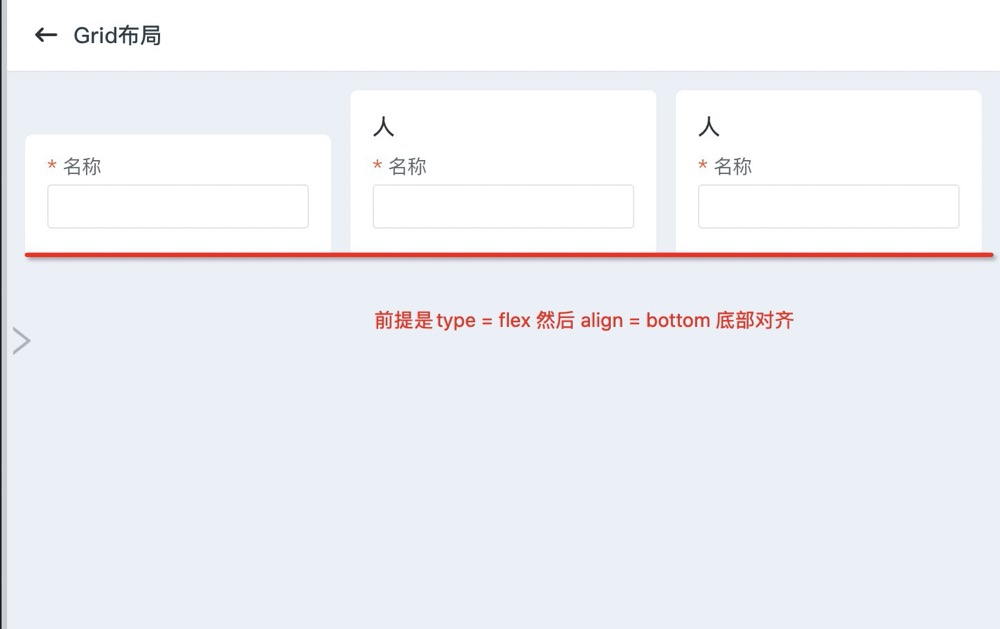
<View title="Grid布局"> <Row type="flex" align="bottom"> <!-- 对应type = flex align 垂直对齐方式 比如当前的底部对齐 --> <Col :span="8"> <Form key="table" model="trantor_doc_Person"> <Fields> <Field name="name" /> </Fields> </Form> </Col> <Col :span="8"> <Form key="table" model="trantor_doc_Person"> <Fields> <Field name="name" /> </Fields> </Form> </Col> <Col :span="8"> <Form key="table" model="trantor_doc_Person"> <Fields> <Field name="name" /> </Fields> </Form> </Col> </Row></View>- 水平对齐
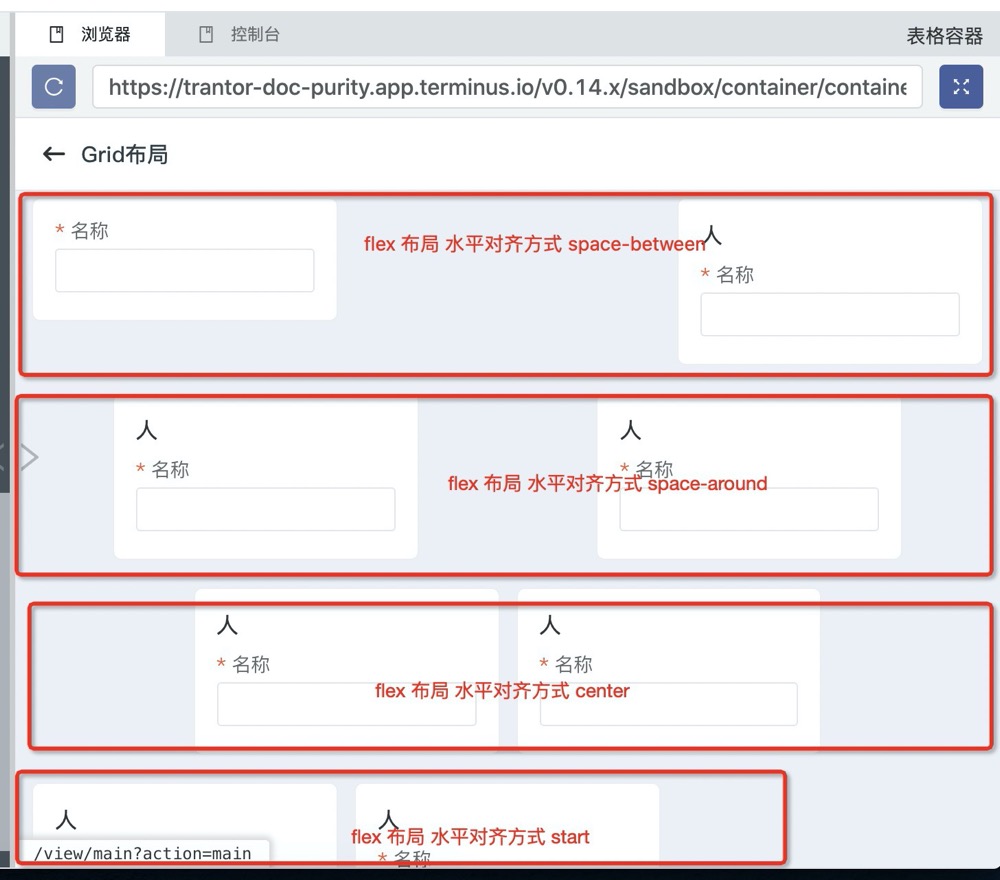
<View title="Grid布局"> <Row type="flex" justify="space-between"> <!-- 对应type = flex justify 水平对齐方式 --> <Col :span="8"> <Form key="table" model="trantor_doc_Person"> <Fields> <Field name="name" /> </Fields> </Form> </Col> <Col :span="8"> <Form key="table" model="trantor_doc_Person"> <Fields> <Field name="name" /> </Fields> </Form> </Col> </Row> <Row type="flex" justify="space-around"> <Col :span="8"> <Form key="table" model="trantor_doc_Person"> <Fields> <Field name="name" /> </Fields> </Form> </Col> <Col :span="8"> <Form key="table" model="trantor_doc_Person"> <Fields> <Field name="name" /> </Fields> </Form> </Col> </Row> <Row type="flex" justify="center"> <Col :span="8"> <Form key="table" model="trantor_doc_Person"> <Fields> <Field name="name" /> </Fields> </Form> </Col> <Col :span="8"> <Form key="table" model="trantor_doc_Person"> <Fields> <Field name="name" /> </Fields> </Form> </Col> </Row> <Row type="flex" justify="start"> <Col :span="8"> <Form key="table" model="trantor_doc_Person"> <Fields> <Field name="name" /> </Fields> </Form> </Col> <Col :span="8"> <Form key="table" model="trantor_doc_Person"> <Fields> <Field name="name" /> </Fields> </Form> </Col> </Row></View>