字典
字典是Trantor定义的枚举类的静态资源。如,国家字典,包含中国、美国、英国等枚举字典项。这类资源用以在模型构建时,维护枚举类字段,从而体现在业务中,用以做业务内容识别和代码逻辑判断。开发者用户可以在控制台进行字典及字典中的枚举项维护,或者在线下模块中声明字典资源,在模型字段创建时声明使用的字典。
定义字典
一个普通的Java类通过 @TDict 注解即可得到trantor的字典资源。通过 @Label 注解描述的 public static final 属性就是该字典下的字典项。因为业务需求,难免会需要String类型或者Integer类型的枚举值,所以trantor也提供了两种类型的字典。
作为Trantor模块下资源,我们推荐将其定义在
api模块的dict包中。参考开发指南-模块中的包结构
- Integer类型字典
@TDict(name = "性别", desc = "性别枚举", type= TDictType.Int)public class SexEnum implements ItemDisplaySortRule {
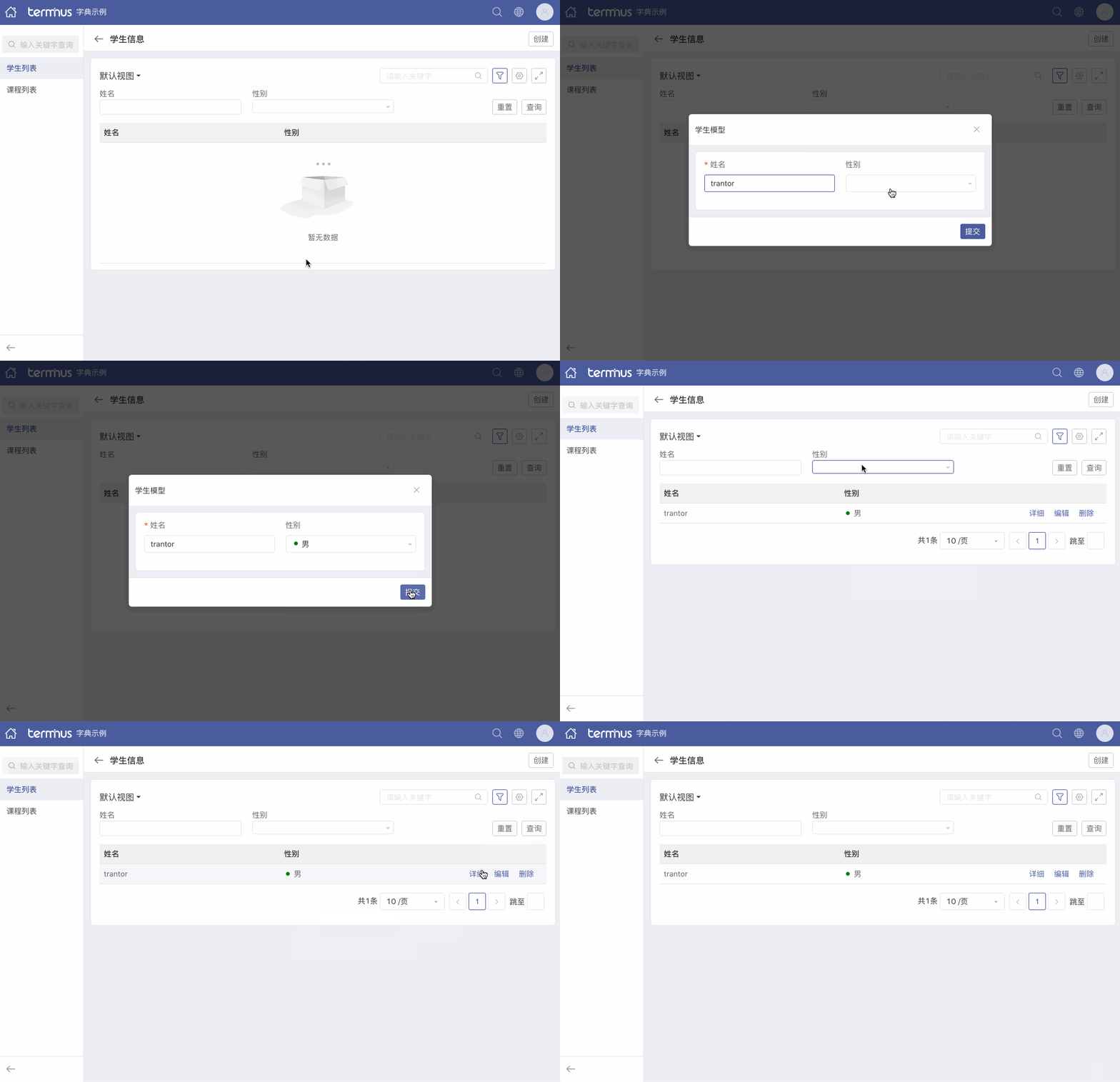
    @Label(value = "男", icon = Icon.dot, iconColor = Icon.Color.Blue, displayOrder = 1)    public static final Integer male = 0;
    @Label(value = "女生", icon = Icon.dot, iconColor = Icon.Color.Green, displayOrder = 2)    public static final Integer female = 1;
@Label(value = "保密", icon = Icon.dot, iconColor = Icon.Color.Orange, displayOrder = 3) public static final Integer unknown = 2;}- String类型字典
@TDict(name = "课程", desc = "所有课程的枚举")public class SubjectEnum implements ItemDisplaySortRule {
   @Label(value = "语文", dictItemGroup = {"arts"})    public static final String Chinese = "Chinese";
    @Label(value = "数学", dictItemGroup = {"science"})    public static final String Mathematics = "Mathematics";
    @Label(value = "英语", dictItemGroup = {"arts", "science"})    public static final String English = "English";
}
参数解释
- @TDict
| 属性 | 类型 | 必填 | 默认值 | 解释 |
|---|---|---|---|---|
| key | String | 否 | 当前类名 | 字典原始key |
| name | String | 否 | 当前类名 | 字典名称 |
| desc | String | 否 | 空字符串 | 字典描述 |
| type | Enum | 否 | TDictType.String | 字典类型 |
- @Label
| 属性 | 类型 | 必填 | 默认值 | 解释 |
|---|---|---|---|---|
| value | String | 是 | - | 字典项展示名 |
| icon | Enum | 否 | Icon.None | 字典项展示名前的图标 |
| iconColor | Enum | 否 | Icon.Color.Black | 字典项展示名前的图标颜色 |
| displayOrder | Integer | 否 | ItemDisplaySort.DEFAULT_DISPLAY_ORDER | 字典项的排序值 |
| dictItemGroup | Array | 否 | 空数组 | 字典项分组 |
字典项分组
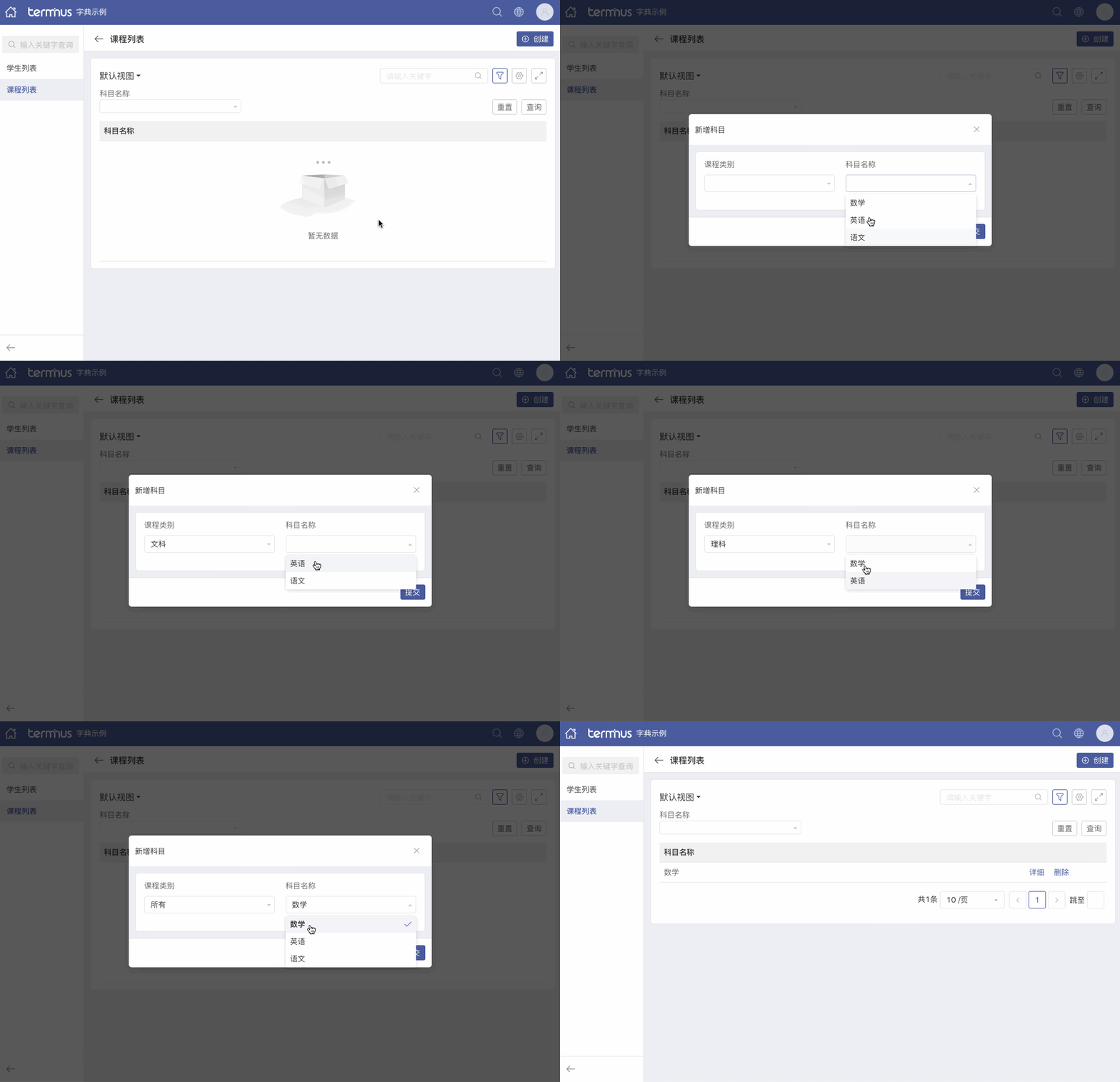
在日常业务中会经常出现枚举值分类的需求,已上面的课程为例,可以分为文科、理科 两类。那这个时候我们通过@Label 注解中的 dictItemGroup 属性进行提前标记,然后在视图中使用。
<Field name="type"/><Field name="name"> <RenderType> <Select :allowGroups="(!this.data.type || this.data.type==='all')? ['arts', 'science']: this.data.type==='arts' ? ['arts']:['science']"/> </RenderType></Field>我们可以看到上面视图代码中以 type 字段的值作为条件,当等于 undefined 或者 all 的时候显示 arts 和 science两个分组下的 字典项;当等于 arts 时显示 arts 分组下的字典项;当等于 science 时显示 science 分组下的字典项。
:allowGroups参数接受的是一个
字符串数组。
示例展示
- 带图标的字典项
- 字典项分组